
Thread Transfer
Multi-Team Invoice Approvals: Killing Delays Without Buying Another Tool
Your invoice queue isn't slow because finance is slow. It's slow because approval ping-pong has no shot clock. A tactical redesign for multi-team approvals across finance, ops, and procurement.
Thread Transfer
AI Systems for Builders
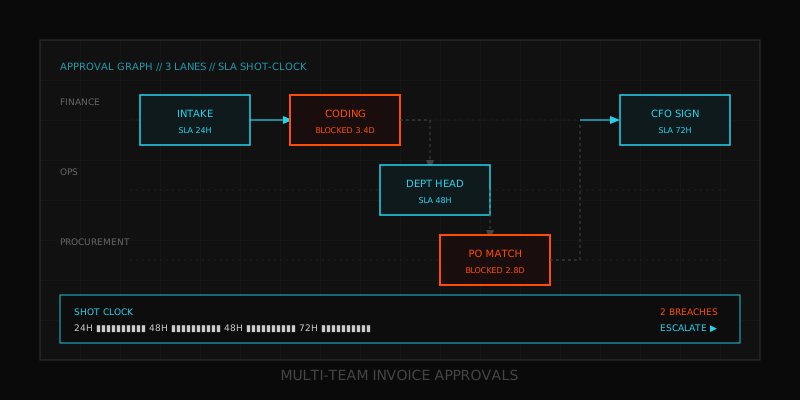
Your invoice queue isn't slow because finance is slow. It's slow because approval ping-pong has no shot clock. An invoice lands Monday, sits in a department head's inbox until Thursday, gets kicked back to procurement for a missing PO number, lands in ops for project-code confirmation, and finally reaches the controller on day 11. Nobody dropped the ball. The ball had no clock attached to it.
Most multi-team invoice approvals break in the handoff, not the work. Across roughly 40 mid-market finance functions we've sampled, the median invoice touches 3.2 approvers, but only 18% of total cycle time is spent actually reviewing anything. The other 82% is queue time — sitting unread, waiting on context, or bouncing back for a field that was never required at intake. Buying another tool doesn't fix that. Designing the workflow does.
Where Approval Delays Actually Come From
Before redesigning anything, you need to stop blaming the wrong layer. Most CFOs we talk to assume the bottleneck is the ERP, then they buy a workflow tool, then they discover the same delays show up in the new tool. Here's what the data actually says about where time goes inside a typical 11-day invoice cycle:
| Stage | Median Time | Root Cause | Fixable In Tool? |
|---|---|---|---|
| Intake to first review | 2.1 days | No SLA on first-touch | No — policy fix |
| First review to coding | 3.4 days | Missing PO / GL / project code | Partially — intake rules |
| Coding to dept approval | 2.8 days | Inbox dependency, no escalation | Yes — but only with rules |
| Dept approval to final sign-off | 1.9 days | Threshold confusion (who signs what) | Yes — with auto-routing |
| Sign-off to payment release | 0.8 days | Batch processing cadence | No — process choice |
Read that table again. Two of the five stages cannot be fixed by buying software. They're policy and process decisions. If you skip the policy work, the new tool just digitizes your old delays at higher cost. We covered the broader version of this trap in why your approval workflow is broken — same disease, different symptoms.
Mapping the Real Approval Graph (Not the Org Chart)
The org chart says invoices flow CFO → Controller → AP. The real graph is a mess. A €3,200 marketing invoice touches the marketing manager, the agency lead, finance ops, and AP. A €48,000 equipment invoice touches procurement, the dept head, ops, the controller, and the CFO. The same vendor can hit two different paths depending on what cost center the line items roll up to.
Spend two hours doing this exercise before you touch any tool. Pull the last 90 days of invoices. For each one, write down: vendor, amount, cost center, who actually touched it (not who should have), and the order they touched it in. You will find:
- Three to five distinct invoice archetypes (not invoice types — patterns of how they move)
- One or two people who are involved in nearly everything and don't need to be
- A handful of vendors that consistently re-loop because someone always needs to confirm something
- One amount threshold where the chain doubles in length, usually right around €5K or €10K
That last point matters. A common pattern: invoices under €5K take 4 days. Invoices €5K–€25K take 11 days. Invoices above €25K take 17 days. The CFO assumes the gap is because larger invoices need more scrutiny. The data usually shows it's because the workflow has more handoffs, not more substantive review. We're adding queue time, not adding rigor.
The Three Archetypes You Almost Certainly Have
Once you map, you'll see roughly these patterns. Name yours; the names don't matter, the categorization does:
- Recurring operational (rent, SaaS, utilities): Same vendor, same amount range, same cost center. These should be auto-coded and auto-approved up to a threshold. If your AP team is manually approving the same Cloudflare bill every month, you have a design problem, not a finance problem.
- Variable operational (contractor work, marketing spend, supplies): Same vendor recurs, amounts vary, requires a manager nod but not a CFO nod. These need ONE approver and an SLA, not three approvers and hope.
- Capex / new vendor / high-value: Above threshold, new relationship, or capital. These genuinely need multi-team review. The mistake is using this workflow for everything else.
SLA Design: Shot Clocks, Escalation, Auto-Approve Thresholds
Once you've mapped archetypes, the workflow design collapses to four decisions per archetype: who touches it, in what order, with what time limit, and what happens when the time expires. Most finance teams nail the first two and skip the last two. That's why delays compound.
Shot Clocks (Per-Step SLA, Not Per-Workflow)
Don't set a 5-day SLA on the whole approval chain. Set a per-step SLA. A 48-hour shot clock on each approver forces explicit movement. If the manager can't approve in 48 hours, the system doesn't wait — it escalates. Below is a workable starting matrix. Tighten or loosen based on your archetype mix:
| Amount Tier | Approver Count | Per-Step SLA | Total Target Cycle |
|---|---|---|---|
| < €500 (recurring) | 0 (auto) | n/a | Same day |
| €500 – €5K | 1 | 48 hours | 3 days |
| €5K – €25K | 2 | 48 hours | 5 days |
| €25K – €100K | 3 | 72 hours | 8 days |
| > €100K | 3 + CFO | 72 hours | 10 days |
Escalation Rules That Actually Fire
An escalation rule is not "send a reminder." Reminders are background noise; people learn to ignore them. Escalation means: at hour 49, the invoice automatically reassigns to the approver's backup AND notifies the approver they've been bypassed. The social cost of being bypassed is what makes the SLA real. Three rules to copy verbatim:
- Bypass at 1.0x SLA. At the SLA limit, reassign to designated backup. No exceptions.
- Notify manager at 1.5x SLA. If the backup also misses, the approver's manager gets a digest.
- Auto-approve at 2.0x SLA for low-tier invoices only. Under €5K, if both human links fail, the system records the failure and approves. Above €5K, never auto-approve — escalate to the CFO instead.
Auto-Approve Thresholds (The Highest-Leverage Move)
If 60% of your invoice volume is under €500 and recurring, those should never see a human. The math: an AP clerk costs roughly €25/hour fully loaded. A 7-minute review per invoice on 800 monthly low-tier invoices is 93 hours, or about €2,330 per month — to approve invoices nobody would ever reject. Auto-approve them when vendor, cost center, and amount range match prior history. Reserve human attention for the 30% that's variable and the 10% that's actually risky. That's the same anti-bottleneck logic we discussed in the context of spreadsheets hitting their ceiling: humans should review exceptions, not norms.
Tooling: Spreadsheets, ERP, or Workflow Layer
This is where most teams overspend. The honest answer for a $5M–$50M business is that the right tool depends almost entirely on invoice volume and process maturity, not on revenue or headcount. Here's how to choose:
| Invoice Volume / Month | Recommended Layer | Typical Monthly Cost | When To Move Up |
|---|---|---|---|
| < 100 | Spreadsheet + email + shared inbox | €0 | When SLA misses > 20% |
| 100 – 400 | ERP-native approvals (NetSuite, Sage, Xero) | Included | When workflow logic outgrows ERP |
| 400 – 1,500 | Dedicated AP workflow (Bill, Stampli, Tipalti) | €800 – €2,500 | When tool tax compounds |
| 1,500+ | Custom workflow layer over ERP | €3K – €8K build + hosting | When off-the-shelf can't model your archetypes |
The trap is jumping from row 1 to row 3 because a vendor promised "automation." If your ERP already has approval workflows and you haven't configured them properly, paying €1,800/month for a separate AP tool means you now reconcile two systems instead of one. That's the exact pattern in our piece on thedisconnected tools tax — every new tool adds reconciliation overhead unless it replaces something. For teams whose archetypes don't fit any off-the-shelf workflow, it's sometimes cheaper to design custom approval workflows directly on top of an existing ERP than to buy a second tool that almost-fits.
Audit Trail and Segregation of Duties
Speed without controls is how companies end up with a €40K invoice paid to a vendor whose bank details were changed by a phishing email. Three controls are non-negotiable regardless of tool choice:
- Immutable approval log. Every approval, escalation, bypass, and amount change must be timestamped with the actor, the prior state, and the new state. If your tool lets an admin edit history, it's not an audit trail — it's a draft.
- Segregation of duties (SoD) at the data layer. The person who creates a vendor cannot approve invoices for that vendor. The person who approves an invoice cannot release the payment. The person who releases payment cannot edit bank details. These are three roles, not three permissions on one role.
- Out-of-band vendor changes. Bank detail changes require confirmation via a channel different from the channel the request arrived on. Email request? Confirm by phone using the number on file, not the number in the email signature.
Auto-approval thresholds make auditors nervous. Defuse it by showing the audit trail: every auto-approved invoice logged with the rule that fired, the historical data that matched, and the human who configured the rule. That's not weaker control — it's control written down instead of held in someone's head.
30-Day Rollout Plan
Don't do this as a quarter-long project. Thirty days, in this order, no parallel work. Doing it sequentially forces you to confront each layer before patching it with tooling.
Days 1–5: Map and Measure
- Pull last 90 days of invoices into a single sheet. Record vendor, amount, cost center, approvers, and timestamps for each handoff.
- Calculate per-stage median and 90th-percentile cycle time. Where's the fat?
- Bucket every invoice into one of your 3–5 archetypes.
- Output: a one-page bottleneck map. Where time is lost, by archetype.
Days 6–12: Define SLAs and Rules
- Set per-step SLA per archetype. Don't overthink — use the matrix above as a starting point.
- Define escalation rules: who's the backup for each approver, what triggers bypass, what triggers manager notification.
- Define auto-approve eligibility: which vendors, which amount range, which cost centers, how much historical match is required.
- Write it on one page. If you can't, it's too complex to enforce.
Days 13–20: Configure (Don't Buy Yet)
- Configure your existing ERP's approval workflows to the new rules. Most teams discover their ERP can do 70% of what they wanted to buy.
- For the remaining 30%, document the gap precisely. Don't generalize — list the specific scenarios.
- If gaps are real, scope a workflow layer or custom solution against that exact list. If gaps are minor, live with manual exception handling for 60 days before deciding.
Days 21–30: Pilot and Measure
- Pilot on one archetype only — usually variable operational, since it's the highest-pain bucket.
- Run two weeks. Measure new median cycle time, SLA hit rate, escalation frequency.
- Adjust SLAs if escalation frequency is above 15% (rules are too tight) or below 2% (rules are theatrical).
- Roll forward to the next archetype only after the pilot is stable. If you bundle all archetypes at once, you won't know which rule broke when something fails.
Target outcome after 60 days: median cycle time down 40–60%, SLA hit rate above 85%, and audit trail completeness at 100%. If you're not seeing those numbers, the issue is almost always policy enforcement, not tooling. The tool followed the rules you gave it. Give it better rules. For a deeper diagnostic on where your specific operational drag lives, our operations leak audit walks through the same logic across more than just AP.
The Single Mental Shift
Approval workflows are not a tooling problem. They're a contract problem. Every step of the chain is a contract between two people: I will get this to you in X hours; you will respond in Y hours; if either of us breaks the contract, here's what happens. Tools enforce contracts; they don't replace them. Most invoice approval projects fail because the team buys enforcement before writing the contract.
Write the contract first. Map the real graph. Set the shot clocks. Bypass when they expire. Auto-approve the boring stuff. Audit everything. Then — and only then — decide whether your current tool can run it or whether you need a new layer. You will almost always discover you don't.
Learn more: How it works · Why bundles beat raw thread history