
Thread Transfer
The Disconnected Tools Tax: What 12 SaaS Subscriptions Are Actually Costing You
Your team uses 12 tools. None of them talk to each other. The 13th hire isn't the answer — it's the bridge between the tools, which doesn't have a SaaS vendor because nobody can package what your operation needs.
Thread Transfer
Operations Systems for SMBs
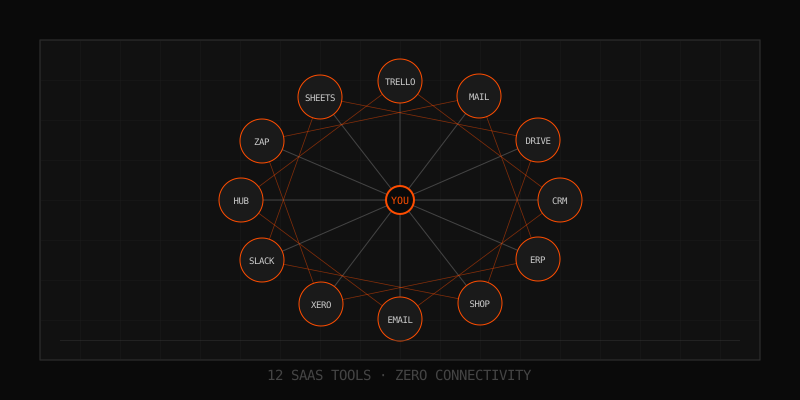
A 24-person logistics company we audited last quarter was paying for 14 SaaS subscriptions. Their combined monthly bill was $3,847. The owner described each tool as "essential." Then he described his operations manager — the person whose entire job is moving data between those essential tools — as "drowning." Both statements were true. Neither was a coincidence.
This is the disconnected tools tax. Nobody sends you an invoice for it. It doesn't appear on your P&L. But it's there in every shift handoff, every status meeting, every "let me check and get back to you," every customer who churned because the answer to their question lived in a tab nobody opened. The tax compounds quietly until one day you're hiring a third coordinator and you still feel slow.
The Tool Stack You Didn't Mean to Build
No SMB sets out to run 12+ tools. It happens one solved problem at a time. The CRM solved lead tracking in Year 1. The accounting platform solved invoicing in Year 2. Then someone added a project management tool because emails were chaos. Then a separate inventory app because the CRM "wasn't built for that." Then a scheduling tool. Then a documentation wiki. Then a customer support inbox. Then a forms tool to collect data the CRM couldn't capture. Then a BI tool to visualize the data the other tools were generating in incompatible formats.
Each decision was rational. The aggregate is irrational. According to Productiv's 2025 SaaS Management Index, the average mid-market company runs 269 SaaS apps. SMBs aren't there yet — but the trajectory is identical. A 20-person company averaging 12-15 tools is now the floor, not the ceiling.
The math nobody runs
Let's price out a realistic 22-person services business. These numbers are illustrative but anchored to public list prices for the 2025-2026 plan tiers.
| Tool | Category | Monthly Cost | Seats |
|---|---|---|---|
| HubSpot Sales Hub | CRM | $450 | 5 |
| QuickBooks Online Advanced | Accounting | $235 | 3 |
| Asana Business | Project Mgmt | $528 | 22 |
| Slack Pro | Comms | $190 | 22 |
| Google Workspace Business | Email/Docs | $396 | 22 |
| Calendly Teams | Scheduling | $80 | 5 |
| Zoom Business | Video | $240 | 10 |
| Notion Business | Docs/Wiki | $330 | 22 |
| Zendesk Suite Growth | Support | $345 | 5 |
| Typeform Business | Forms | $99 | 3 |
| DocuSign Standard | Contracts | $135 | 3 |
| Stripe + Plaid fees | Payments | $420 | — |
| Total subscriptions | $3,448 |
That's $41,376/year in direct SaaS spend. Most owners benchmark this against the headcount it would replace and feel fine. They're benchmarking the wrong line item.
The Real Tax: What These Tools Cost When They Don't Talk
The subscription fee is the cheapest part of disconnected tools. The expensive part is the human pipeline you've quietly built to compensate for missing integrations. Most SMBs don't realize this pipeline exists until they try to fire someone and discover that 60% of that person's job was undocumented data movement.
Here's where the actual money leaks. These are categories we've measured in real audits — your numbers will vary, but the structure holds.
1. Manual re-entry
Every time a piece of information enters one system and a human types it into another, that's a tax. Lead comes in via Typeform → typed into HubSpot. Deal closes in HubSpot → invoice typed into QuickBooks. Project kicks off → task list rebuilt in Asana. Customer asks status → operator opens four tabs to answer.
At 22 people, conservative estimate: each non-engineering employee loses 35-50 minutes per day to re-entry, lookup, and tab-switching. At a $52/hr loaded cost, that's roughly $30 per person per day. Across 18 affected employees: $540/day, or $135,000/year. That number alone is 3.3x the subscription stack.
2. Data drift and reconciliation
When the same customer record lives in five systems, four of them are wrong at any given moment. Sales updates the CRM but not the support tool. Ops updates the project management tool but not the CRM. Finance updates billing in QuickBooks but not anywhere else. Nobody is malicious — everyone is busy.
The downstream cost: monthly reconciliation cycles where someone spends 2-3 days reconciling what the truth actually is. Bad reports get sent to the owner. Decisions get made on bad reports. The owner's gut starts overriding the data — which is correct, because the data is wrong — but now you have a culture where data doesn't matter, which is its own catastrophe.
3. The integration tax
This is the most insidious one. Once you have 12 tools, you discover Zapier. You build 47 zaps. They work — until they don't. A zap silently fails on Tuesday. You find out Friday. You spend the weekend reconciling. You add a "zap monitoring" Slack channel. You hire someone to "own integrations." Now your no-code stack has a no-code dependency manager.
For a 22-person company, the integration-glue layer typically costs $200-400/month in Zapier/Make fees plus 8-15 hours/month of maintenance. That's another $1,500-2,000/month in hidden cost — and it's the most fragile layer of your entire operation.
4. Decision latency
This one doesn't show up on a spreadsheet, but it's the one that eventually kills companies. When your data is spread across 12 systems, every important question — "Are we profitable on this customer?" "What's our true CAC?" "Why is fulfillment slowing down?" — requires a project. A project requires people. People are busy. So the question doesn't get answered, and you make the decision anyway, blind.
Owners who feel "slow despite working harder" almost always have a decision-latency problem, not an effort problem.
What the Tax Actually Looks Like (Side-by-Side)
| Cost Category | Visible on P&L? | Typical Monthly Cost (22-person SMB) |
|---|---|---|
| SaaS subscriptions | Yes | $3,448 |
| Manual re-entry labor | No (buried in payroll) | $11,250 |
| Integration glue (Zapier + maint) | Partially | $1,750 |
| Reconciliation / data cleanup | No | $2,400 |
| Decision latency (revenue lost) | Never | $3,000-8,000 |
| True monthly cost | $21,848-26,848 |
The subscription line is 13-16% of the true cost of running disconnected tools. The other 84% is invisible — which is precisely why nobody fixes it.
Why "Just Add Another Tool" Doesn't Work
The instinct, every time, is the same: "There must be a SaaS that solves this." There isn't. Not because the SaaS industry isn't trying — they are — but because the problem isn't a missing tool. The problem is that your operation is specific and the tools are generic.
Generic tools optimize for the 80% case so they can sell to everyone. Your bottleneck is in the 20% — the way your team actually does the work, which is shaped by your customer mix, your margins, your geography, your team skills, and ten other things no SaaS roadmap will ever care about. Adding a 13th generic tool to solve the gaps left by 12 other generic tools just creates a 13th data silo and a 14th integration to maintain.
The "all-in-one" trap
"Just consolidate into one platform" sounds good in theory. In practice, all-in-one platforms (HubSpot Operations Hub, Zoho One, Odoo, NetSuite) solve the integration problem by being mediocre at twelve things instead of great at one. You'll still need exceptions, exports, manual processes — and now you've also locked your entire business into one vendor's roadmap and one vendor's price hikes.
We've seen companies migrate to "all-in-one" stacks and emerge 18 months later running 9 SaaS tools in addition to the all-in-one, because the all-in-one couldn't do the things their team actually needs. The bill goes up. The silos remain.
The Bridge Layer Nobody Sells
The actual answer to disconnected tools isn't more tools or one mega-tool. It's a thin custom layer that sits on top of the tools you already have, owns the data model your operation actually uses, and pulls/pushes to the SaaS apps via API where useful. This layer is the connective tissue.
What it does:
- One source of truth. Your customer, your order, your project — defined once, the way your operation actually thinks about them. SaaS tools become spokes, not sources.
- Bi-directional sync where it matters. Not every field, not every record — just the 15-20 fields that actually drive decisions and operations.
- Workflows in your language. "When a customer's invoice is 30 days overdue AND they have an open project, pause the project and notify the AM" — that's a sentence, not a Zap.
- Dashboards that answer real questions. Not "leads this month" — "which customers are at risk based on payment, support tickets, and project velocity combined?"
- One login for operators. The 80% of the work happens in your custom layer. The SaaS tools are visited only when needed.
This is what OpsMavix builds for SMBs. Not another SaaS subscription. A bespoke operational layer that turns your existing 12 tools into a coherent system instead of a tax bill. The build is one-time. The savings compound monthly — and unlike SaaS, the system you get is yours.
What Gets Built, In Practice
Every operation is different, but the patterns repeat. Here's what an SMB typically gets when they replace the integration glue with a custom layer.
For services businesses
A unified customer-and-project view. Quoting that pulls from your service catalog and pushes signed deals into the CRM, accounting, and project management tools simultaneously. Capacity planning that knows what's booked, what's quoted, and what's at risk — without anyone typing it into Asana.
For ecommerce and inventory-heavy ops
The most common build we see is a custom inventory system that bridges the gap between Shopify (or whatever storefront), the 3PL or warehouse system, accounting, and the supplier ordering process. Most off-the-shelf inventory SaaS tools handle 70% of the workflow and force humans to handle the other 30% via spreadsheets. The custom layer closes the 30%.
For agencies and professional services
A profitability engine. Time tracking, project costs, retainer status, scope creep flags, and renewal pipeline — in one view. Owners get the question they actually want answered: "Which clients am I making money on, right now, this month?"
The Decision Framework
Not every business should rip out their tools. Here's when the custom layer pays off and when it doesn't.
| Situation | Build custom layer? |
|---|---|
| Under 10 people, simple ops, < 6 tools | No — stick with SaaS |
| 10-50 people, 8+ tools, growing pains | Yes — biggest ROI here |
| 50+ people, mature ops, custom needs | Yes — usually already built one |
| Owner spends >5 hrs/week in reports | Yes — leading indicator |
| Hiring next ops coordinator | Pause — that hire might be a system, not a person |
If you're hiring your second or third ops coordinator, you're not solving an operations problem — you're papering over a systems problem with payroll. The next hire is between $55K-$85K loaded. A custom operational layer is typically a fraction of that as a one-time build, and it doesn't take vacation.
The Mental Shift
SMB owners have been trained, by a decade of SaaS marketing, to believe that "more tools = more capability." It's true at first. It stops being true around tool #6, and reverses sharply by tool #10. By tool #12, the marginal SaaS subscription is actively making your business slower, more fragile, and more expensive to run.
The shift is from "what tool do I need?" to "what does my operation need to look like, and which tools serve that?" Tools are spokes. Your operation is the hub. Most SMBs accidentally invert this — they let the tools define how the operation runs — and then they're surprised when the operation feels janky and disconnected. Of course it does. It is.
How OpsMavix Approaches This
We start every engagement with an Operations Leak Audit. We map your current tool stack, identify where data is duplicated, where humans are filling integration gaps, and where decisions are being delayed by missing visibility. You get a written report whether or not we ever work together — most owners use it to clean up their existing stack, kill duplicate subscriptions, and identify the two or three workflows where a custom layer would pay for itself in under six months.
If a custom build does make sense, we scope the smallest possible version that fixes the biggest leak first. Not a 12-month enterprise project. A focused build that ships in weeks, replaces the most painful manual process, and gives you a foundation you can extend as the operation grows. The custom layer you get is documented, owned by you, and doesn't have a per-seat price.
If you've crossed the tool-sprawl threshold and you can feel the tax — slow answers, drowning ops manager, reports nobody trusts, integrations that break on Sunday — the audit is the cheapest hour you'll spend this quarter. Book it at opsmavix.com. No pitch deck, no enterprise sales theater. Just a clear-eyed look at where your operation is bleeding and what it would take to stop it.
Learn more: How it works · Why bundles beat raw thread history