
Thread Transfer
Why Invoice Approval Workflows Are the Hidden Bottleneck in Finance
Your AP team spends 40% of its week chasing approvals. The invoices sit in inboxes, the deadlines slip, and nobody can tell you where any of it stands. Here's the fix.
Thread Transfer
Operations Systems for SMBs
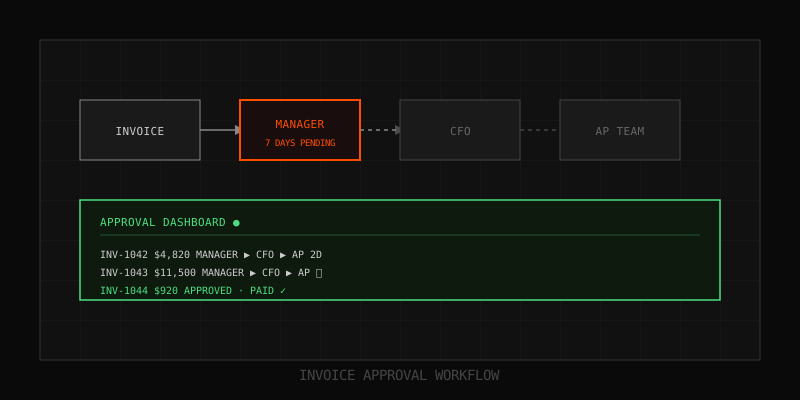
It's the 28th of the month. Your AP clerk has 47 invoices that need to ship by end-of-week. She opens Outlook, drafts an email to the department head with the PDF attached, types "Please approve when you get a chance," and clicks send. Then she opens a spreadsheet, logs the invoice number in row 312, and color-codes the cell yellow. Then she does that 46 more times.
Three days later, 19 of those invoices are still sitting unread in inboxes. Two department heads are on vacation. One invoice was forwarded to the wrong person, who deleted it. Another was approved verbally on a Zoom call but never confirmed in writing. The clerk now has to chase each one individually — Slack pings, follow-up emails, "just bumping this" replies — while the actual finance work piles up behind her.
This is the invoice approval workflow at most small and mid-sized businesses. It is not a process. It is a series of polite interruptions held together by one person's memory and a color-coded spreadsheet. And it costs you more than you think.
The real cost of email-based approvals
We audited the AP function at 14 SMBs in the last six months — companies between $2M and $40M in revenue, processing between 80 and 900 invoices per month. The numbers are remarkably consistent.
The average invoice takes 4.2 business days to move from "received" to "approved for payment." That sounds reasonable until you realize that the actual work involved — reviewing the invoice, checking it against the PO, clicking approve — takes about 90 seconds. Everything else is waiting, chasing, re-sending, and re-explaining.
Here's what we found across those 14 audits, normalized to a company processing 200 invoices per month:
| Failure mode | % of invoices affected | Avg delay added | Hours/month lost |
|---|---|---|---|
| Approver didn't see the email | 22% | 2.1 days | 14 hrs |
| Wrong approver routed | 9% | 3.4 days | 8 hrs |
| Missing supporting docs (PO, contract) | 17% | 2.8 days | 11 hrs |
| Approval given verbally, no paper trail | 14% | n/a (audit risk) | 6 hrs (reconstruction) |
| Multiple approvers, sequence broke | 11% | 4.7 days | 9 hrs |
| Duplicate invoice paid twice | 1.8% | n/a (cash loss) | 4 hrs (recovery) |
That's roughly 52 hours per month of AP time spent doing nothing except trying to get other humans to do a 90-second task. At a fully-loaded AP salary of $58K/year, you're burning about $1,750/month — $21,000/year — on chase work. That's before you count the cost of late fees, lost early-payment discounts, and the trust erosion with vendors who get paid 30 days late.
Why email broke as an approval mechanism
Email worked fine in 2008 because most people lived in their inbox and had maybe 40 messages a day. In 2026, the average mid-level manager gets 121 emails per day, ignores about 40% of them on first pass, and uses Slack/Teams as their actual primary inbox. Your invoice approval email is sitting in a graveyard.
But the bigger problem isn't volume — it's that email lacks three things every approval workflow needs:
- State. An email can be read, unread, replied to, forwarded, archived, or deleted. None of those states equal "approved" or "rejected." You have to interpret what a human did and translate it manually.
- Structure. The approver can write "approved," "looks good," "go ahead," "fine with me," or just reply with a thumbs-up emoji. Your AP clerk has to parse all of these and decide which count.
- Memory. Six months from now, when your auditor asks who approved invoice #4471, you'll be searching three different inboxes, hoping nobody hit "delete."
This is why "just use email" feels lightweight but actually creates the most operational debt. Every email approval is a tiny IOU that has to be cashed in by an unpaid human (your AP clerk) instead of by software.
Why most companies don't fix it
When SMB finance teams research a fix, they hit a wall. The big AP automation platforms — Bill.com, Tipalti, Stampli, Coupa — are built for companies processing 1,000+ invoices per month with 5+ approval tiers and integrations into NetSuite or SAP. They charge per-user fees, per-transaction fees, implementation fees, and lock you into their payment rails.
A typical Bill.com setup for a 50-person company runs $79/user/month plus $0.49 per transaction plus the time to migrate three years of vendor data. You're looking at $15K-$30K in first-year cost for a tool whose 80% of features you'll never use.
So the finance team does the math, decides it's "not worth it yet," and goes back to the spreadsheet. The spreadsheet then quietly bleeds out 52 hours per month forever. The fix never gets made because the only options presented are "do nothing" or "buy enterprise software."
There is a third option, and it's the one finance teams are quietly building: a custom-fit approval workflow sized to their actual invoice volume, their actual approval tiers, and their actual accounting stack. Done right, it costs less than one Bill.com seat and handles 90% of the AP friction.
What a working approval workflow actually looks like
Forget the buzzwords for a minute. An approval workflow is just five things, in order:
- Capture. The invoice enters one place — a shared inbox, a portal, an email forwarder — not three different channels.
- Parse. Vendor, amount, line items, PO number, GL code get pulled out automatically. No retyping.
- Route. Based on the parsed data (amount, department, vendor category), the invoice goes to the correct approver(s) in the correct sequence. No human routing decisions.
- Decide. Approver gets a notification with the invoice + PO + contract attached, clicks approve or reject, optionally adds a comment. One screen, one click.
- Record. The decision, timestamp, approver identity, and any comments are logged immutably. The approved invoice flows to your accounting system or payment processor. Audit trail is automatic.
That's it. The reason most SMBs don't have this isn't because it's expensive or complex — it's because nobody on the finance team has time to build it, and the off-the-shelf options are overkill.
If you're at the stage where this pain is real, the practical move is to scope a invoice approval workflow automation built to your specific approval tiers and accounting stack — not adopt a platform that assumes you have 12 entities and a CFO with a dedicated controls team.
The approval tier audit (do this first)
Before you build or buy anything, map your actual approval tiers. Most SMBs find their "policy" exists in three different places and contradicts itself. Here's the format that works:
| Invoice amount | Department | Approver 1 | Approver 2 | SLA |
|---|---|---|---|---|
| $0 - $500 | Any | Dept manager | — | 24 hrs |
| $501 - $5,000 | Any | Dept manager | Finance lead | 48 hrs |
| $5,001 - $25,000 | Ops/Marketing | Dept head | CFO | 72 hrs |
| $25,001+ | Any | Dept head | CFO + CEO | 96 hrs |
| Recurring (SaaS, rent) | Any | Auto-approve if PO matches | — | Same day |
Write this down. Get it signed by the CEO. Then build your workflow around it — not around what people verbally say the rules are.
Two things almost always come out of this exercise: (1) you'll find at least one tier where the "policy" requires three signatures for a $300 invoice, which is why everything below $1,000 routes around the policy and creates audit nightmares; and (2) you'll find a tier where invoices over $10K only need one signature, which is why fraud risk is higher than your insurance assumes.
What to automate, what to leave alone
The mistake most finance teams make is trying to automate the judgment calls. You can't. What you can automate is everything around the judgment call — the routing, the reminders, the document collection, the audit logging.
Automate these:
- Invoice intake. One email address (ap@yourco.com) that captures every invoice. AI parses vendor, amount, dates, line items, PO reference.
- PO matching. If an invoice references a PO, auto-pull the PO and show the variance side-by-side. Variance under 5% can auto-approve.
- Routing. Based on the approval tier table above, the invoice goes to the right person automatically. No human routing decision.
- Reminders. If an approver hasn't acted in 24 hours, send a Slack DM. If 48 hours, escalate to their manager. If 72 hours, auto-escalate to the CFO.
- Audit trail. Every action — invoice received, routed, approved, rejected, paid — is logged with timestamp and identity. Immutable.
- Duplicate detection. Match new invoices against the last 6 months by vendor + amount + date. Flag anything that looks like a re-submission.
Leave these to humans:
- The actual approval decision on anything that isn't a clean PO match. A human looks at the invoice, decides yes or no.
- Vendor onboarding for first-time payees. Tax forms, banking info, fraud verification — humans only.
- Exception handling. Invoices with unusual line items, mismatched POs, or unfamiliar vendors should always escalate to a human.
- Final payment release for amounts above your fraud threshold (we recommend $10K). A human eyes it before the wire goes out.
The finance approval dashboard nobody builds (but everyone needs)
Once routing is automated, the next thing your CFO will ask for is a dashboard. Not a vanity dashboard — a workflow dashboard that answers four questions in real time:
- What invoices are stuck, and with whom? Sorted by days waiting. If something has been waiting 4+ days, it shows up red.
- What's our cycle time trend? Average days from received to paid, by month. If it's creeping up, something is breaking.
- Who are the bottleneck approvers? If one department head consistently sits on invoices for 5+ days, that's a conversation.
- What's the cash exposure? Total dollar value of invoices approved but not yet paid + invoices received but not yet approved. This is your real AP position, not the lagging GL number.
This dashboard is the single highest-leverage piece of finance tooling we build for SMB clients. Once a CFO can see where invoices are stuck, they can apply pressure in the right place instead of yelling at the AP team.
The audit trail problem (and why your auditor will love this)
If you've been through a financial audit, you know the worst part: reconstructing approval history from email chains, Slack threads, and verbal "yeah, I said okay." A custom approval workflow eliminates this entirely because every state change is logged with timestamp, identity, and IP address, in a tamper-evident log.
When the auditor asks "who approved invoice #4471?", you click the invoice, see the full history (received 2026-04-12, routed to Sarah 2026-04-12, approved by Sarah 2026-04-13 at 14:32 from IP 73.x.x.x, second approval by CFO 2026-04-14 at 09:15, paid 2026-04-15), and export it as a PDF. Three minutes instead of three hours.
This isn't a "nice to have." For companies approaching Series B, getting acquired, or pursuing SOC 2 / ISO 27001, an immutable approval audit trail is a hard requirement. The companies that wait until the diligence call to figure this out are the ones that lose the deal.
How OpsMavix Approaches This
The teams we work with at OpsMavix are usually $5M-$50M revenue companies processing 100-800 invoices per month. They've outgrown the spreadsheet, they're not big enough for Coupa, and their finance team is two-to-five people who can't afford to lose a full headcount-equivalent to chase work. We build them a workflow that fits their actual approval tiers, integrates with whatever they're already using (QuickBooks, Xero, NetSuite, custom ERPs), and gives the CFO a real-time view of where every invoice stands.
The build is usually 3-5 weeks, costs a fraction of a year of enterprise AP software, and is owned by the customer — no per-transaction fees, no vendor lock-in, no surprise pricing changes. The output is roughly 40 hours/month returned to your AP team, a cycle time cut from 4+ days to under 24 hours on routine invoices, and an audit trail your CFO can hand to any auditor without a sweat.
If your AP team is bleeding hours into chase work and you want to know exactly how much, we run a Operations Leak Audit that maps your current invoice flow, identifies the specific failure points, and quantifies the time and dollar cost. No pitch, no obligation — just a one-page diagnosis of where the leaks are. Book it at opsmavix.com and we'll get on a call this week.
Learn more: How it works · Why bundles beat raw thread history