
Thread Transfer
The Spreadsheet Ceiling: When Excel Becomes Your Operations Bottleneck
Spreadsheets work until they don't. The transition from 'Excel handles it' to 'Excel costs us' happens faster than most operations leaders realize. Here are the signs.
Thread Transfer
Operations Systems for SMBs
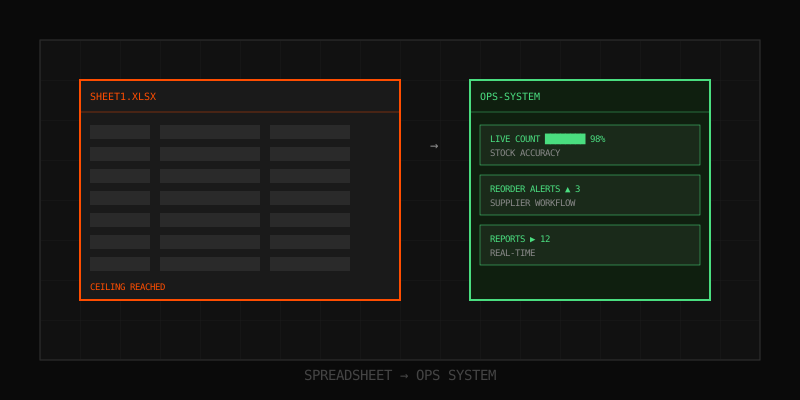
It's 9:47 PM on a Tuesday and your operations manager is in a Google Sheet with 47 tabs trying to figure out why the warehouse picked 320 units of SKU-114 when the order called for 230. Two customers are already escalating. The shipping deadline is tomorrow. The "master sheet" she's looking at was last "rebuilt" four months ago when the previous version became unusable. This new one is showing the same symptoms.
This is the spreadsheet ceiling. Not a single dramatic failure — a slow, expensive accumulation of workarounds that finally costs you more than the fix would have. Most growing businesses hit it somewhere between $2M and $15M in revenue, long before they're ready to swallow a six-figure ERP rollout. The middle is real, it's painful, and almost nobody names it correctly. Below is what the ceiling actually looks like, what it costs, and what to do instead.
What "the ceiling" actually means
Spreadsheets are extraordinary tools. They are also pattern-fragile. Every spreadsheet starts as a clear table and ends as a small private application held together by one person's memory. The ceiling is the point where the spreadsheet stops modeling your business and starts defining it — where decisions are constrained by what the sheet can express, not by what the operation needs.
You don't cross the ceiling all at once. You creep up on it. The early signs are easy to dismiss: "we just need a macro," "I'll fix the formula on Monday," "only Sarah knows that tab." Each individual workaround is reasonable. The aggregate cost is not.
Symptoms vs. severity
| Symptom | Stage | What it actually costs |
|---|---|---|
| One person "owns" the master sheet | Early | Bus factor of 1. Vacation = chaos. |
| Manual copy/paste between sheets daily | Early | 4-8 hours/week of senior ops time |
| Color-coding is your data model | Mid | New hires take 3+ months to be useful |
| Inventory counts and ledger disagree weekly | Mid | 2-5% of revenue lost to shrink/oversell |
| You rebuild the master sheet every 6 months | Late | 40-80 hours per rebuild, plus migration risk |
| The file crashes when opened on certain machines | Late | Decision latency. Data integrity at risk. |
| You quote customers from a stale snapshot | Terminal | Margin destruction. Reputation damage. |
Why this happens to good operators
The instinct to solve a problem in Excel is correct. It's fast, free, and infinitely flexible. The same flexibility that lets a sharp ops lead build a workable system in 3 hours is what makes that system unmaintainable at scale. Three forces compound:
- The flexibility tax. Excel will let you do anything. That includes things you shouldn't do. There's no schema enforcement, so a single typo in a SKU field silently breaks 14 lookups downstream.
- The hero problem. Every spreadsheet-driven business has a hero — usually a senior ops person who has internalized the rules the sheet doesn't enforce. The business runs on their memory. They cannot take a real vacation.
- The "we'll fix it later" reflex. When a process is 90% working, fixing the last 10% feels optional. Until the day it doesn't. By then the workarounds outnumber the original logic.
The ERP trap (and why most middle-market companies fall into it)
The conventional answer is: "you've outgrown spreadsheets, get an ERP." This is mostly bad advice for companies under $20M revenue. Here's the realistic math.
Cost of a typical ERP rollout for a 50-person business
| Line item | Low estimate | High estimate |
|---|---|---|
| License (year 1, 25 seats) | $45,000 | $120,000 |
| Implementation partner | $60,000 | $250,000 |
| Data migration + cleanup | $15,000 | $80,000 |
| Internal staff time (6-12 months) | $40,000 | $150,000 |
| Year 1 total | $160,000 | $600,000 |
And that's if the project succeeds. Industry analyst reports consistently put ERP project failure or significant overrun rates above 50%. The hidden cost is not the money — it's the 9-18 months of operational distraction while the implementation drags. Most $5M businesses cannot afford to put their best operators on a system project for a year.
Worse: ERPs are built for a generic version of your industry. The 80% of features you don't need still show up in every screen, every training session, every onboarding. Your team ends up doing what they did in Excel — but slower, with more clicks, and with a maintenance contract.
The middle nobody talks about
Between the dying spreadsheet and the bloated ERP is a category that doesn't have a tidy name: custom operations systems built to your specific workflow. Not a SaaS product you twist to fit. Not a 600-feature platform. A focused internal tool that does the five or six things your business actually does, with the rules your business actually has.
This used to be impossible for SMBs. Building custom software meant hiring a dev team, writing requirements docs, and waiting 18 months for v1. That economics has changed. With modern tooling, a tight custom system for inventory, orders, or fulfillment can be built and live in 4-8 weeks for less than a single year of ERP licensing. The key word is focused: solve the one process that's bleeding, not everything at once.
For a concrete pattern — a warehouse with consistent overstock and stockout problems, where the spreadsheet "system" requires 12+ hours of weekly maintenance — a custom inventory automation system that mirrors the team's actual picking and reorder logic will typically pay for itself in 60-90 days, just from recovered labor and reduced shrink. The point isn't the technology. The point is removing the workaround tax.
How to know you're at the ceiling (the honest checklist)
Forget vendor "are you ready for our software?" quizzes. Here is the actual diagnostic. If three or more of these are true, you are at or past the ceiling:
- Your "master" spreadsheet is over 50 MB or takes more than 8 seconds to open
- At least one person in operations spends >25% of their week reconciling sheets
- You have rebuilt your main operating spreadsheet at least twice in the last 24 months
- New hires take more than 6 weeks to be productive with your internal tooling
- You've had at least one customer-facing incident in the last 12 months traced to spreadsheet error
- Your inventory count and your accounting figure disagree by >3% at month-end
- You actively avoid hiring junior staff because they "can't be trusted with the file"
- The phrase "only ___ knows how to do that" appears in more than two business processes
What the real cost looks like (a worked example)
Consider a wholesale distributor doing $4.2M in revenue, 18 employees, running operations on a 14-tab spreadsheet that pulls in CSV exports from three different systems daily.
Hidden costs, year 1
| Cost source | Calculation | Annual cost |
|---|---|---|
| Ops manager reconciliation time | 12 hrs/week × $55/hr × 50 weeks | $33,000 |
| Junior staff data entry duplication | 2 people × 6 hrs/week × $28/hr × 50 | $16,800 |
| Inventory error losses (oversell, write-offs) | ~1.8% of revenue | $75,600 |
| Lost sales from stockouts (estimated) | ~0.9% of revenue | $37,800 |
| Discount/rebate errors caught after the fact | ~$2,500/month average | $30,000 |
| Decision latency (illustrative) | Conservative | $20,000 |
| Total drag | ~$213,200 |
This business genuinely believes its operations cost is "just the ops manager's salary plus a $30 Excel subscription." It is actually losing over 5% of revenue to systems drag every year — quietly, in line items that never show up as a single invoice. That's why the problem is so easy to defer: there is no bill that says "spreadsheet ceiling: $213,000."
What replaces the spreadsheet (without becoming a new monster)
The replacement shouldn't be more complicated than the problem. A well-designed custom operations system for a mid-market business has these properties:
- Single source of truth for the one or two things that matter most — usually inventory, orders, or fulfillment status. Not "everything."
- Schema-enforced data. A SKU is a SKU. A date is a date. Typos can't silently break downstream logic.
- Role-based access. The warehouse sees warehouse views. Sales sees sales views. Nobody breaks the file because nobody has access to break it.
- Audit trail. You can see who changed what, when. This alone eliminates 80% of "who edited the formula" forensics.
- Automations for the boring stuff. Reorder triggers, stock alerts, daily reconciliation reports — done by the system, not by Sarah at 9 PM.
- An API or export. Nothing is locked in. If you ever do want to graduate to a full ERP, the data is structured and portable.
What it explicitly is NOT: a 200-page implementation document, a multi-month consulting engagement, or a platform that requires a dedicated admin to maintain. The whole point is to remove the maintenance burden, not relocate it.
The transition (what most people get wrong)
The biggest mistake operators make when leaving the spreadsheet is trying to replace everything at once. The right move is the opposite: identify the single most painful workflow, replace it cleanly, and let the rest of the spreadsheets keep running until they're naturally absorbed.
A reasonable transition for the distributor above:
- Weeks 1-2 — map the actual workflow (not the spreadsheet's version of it). Identify the 4-6 operations that produce 80% of the pain.
- Weeks 3-6 — build the focused tool. Real users testing on real data by week 4.
- Weeks 7-8 — parallel run. Spreadsheet and system both, daily reconciliation. This catches edge cases the spec missed.
- Week 9+ — spreadsheet becomes read-only archive. System is the source of truth.
Total elapsed: ~2 months. Total disruption to operations: low, because the system is being built around the team, not the other way around.
How OpsMavix approaches this
The middle ground between dying spreadsheets and bloated ERPs is exactly what OpsMavix exists for. We build focused custom operations systems for SMBs in the $1M-$25M range — inventory automation, order management, fulfillment tracking, custom dashboards — sized to the actual workflow, deployed in weeks not quarters, owned by you not licensed forever.
If any of the symptoms in this article feel uncomfortably familiar — the 9 PM reconciliation sessions, the rebuilt-master-sheet cycle, the hero-dependency — the first useful step is just measuring what it's costing you. We offer a Operations Leak Audit that walks through your current spreadsheet stack and quantifies the hidden drag in dollars per month. No pitch deck, no commitment. You either find it's not that bad (good — keep using Excel) or you find a number that changes the conversation internally about what to do next.
Run the audit at opsmavix.com. The worst-case outcome is that you spend 30 minutes and walk away with a clearer picture of where your operations are actually bleeding. That's a fair trade against another quarter of pretending the spreadsheet is fine.
Learn more: How it works · Why bundles beat raw thread history