
Thread Transfer
Meta Ads Budget Pacing Formula: How to Compare Spend Distribution Across Accounts
A single formula to score budget pacing across every Meta ad account you manage, plus the three failure modes and the fixes that don't blow up your learning phase.
Thread Transfer
AI Systems for Builders
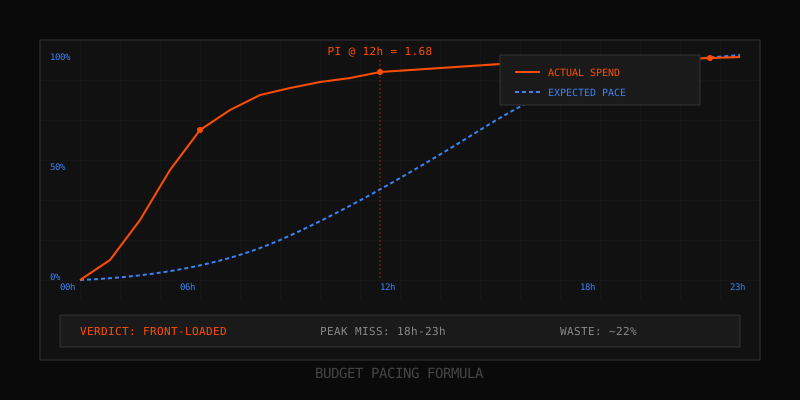
If your daily spend graph looks like a heartbeat instead of a staircase, you're not running campaigns, you're funding Meta's experiments. Most media buyers stare at the "Amount Spent" column and assume the algorithm is doing its job. It isn't. The algorithm is doing its job, which is to exhaust budget. Your job is to make sure it exhausts budget in the hours that actually convert.
This post gives you a single formula to compute pacing health across every ad account you manage, the three failure modes that show up when pacing breaks, and the fixes that don't blow up your learning phase. If you run 5+ accounts, the comparison view at the end is the part you'll actually use on Monday morning.
What "Budget Pacing" Actually Means (And What Meta Doesn't Tell You)
Meta's interface shows you one number: amount spent today. That number is useless on its own. Pacing is the rate of spend across the day relative to where it should be at any given hour. Meta does not surface a "pace health" score. There is no built-in alert when your campaign spent 80% of budget by 11am. You have to compute it yourself, or you will keep paying premium CPMs at the wrong hours forever.
Three things matter for pacing:
- Hourly distribution — what percent of the daily budget was spent in each hour bucket
- Expected curve — what the hourly distribution should look like given your audience, objective, and timezone
- Deviation — the gap between actual and expected, expressed as a single comparable number
Meta gives you (1). You have to invent (2). And (3) is the whole game. We covered the surface-level symptoms in our earlier post on budget pacing problems, but this post goes deeper into the math itself.
The Pacing Formula: Actual Spend vs Expected Spend at Hour H
Here's the formula. Memorize it. Put it in a spreadsheet. Stop guessing.
Pacing Index (PI) = (Cumulative Spend at Hour H) / (Expected Cumulative Spend at Hour H)
Where Expected Cumulative Spend at Hour H = Daily Budget × Expected Cumulative % for that hour. Expected Cumulative % comes from a baseline pacing curve. The simplest baseline is linear: every hour should consume 1/24th of the daily budget, so by hour 12 you expect 50% spent. Linear is a starting point, not gospel — most consumer audiences shouldn't pace linearly because user activity isn't linear.
Interpretation of the Pacing Index:
| PI Range | Status | Meaning |
|---|---|---|
| 0.85 – 1.15 | Healthy | On-pace, no action needed |
| 1.15 – 1.40 | Overpacing | Spending faster than schedule — investigate |
| >1.40 | Front-loaded | Will exhaust before peak hours |
| 0.60 – 0.85 | Underpacing | Algorithm hesitant — check delivery diagnostics |
| <0.60 | Idle | Severe under-delivery — likely bid or audience issue |
For a campaign with a $200 daily budget, at 12pm under a linear baseline you expect $100 cumulative spend. If actual is $168, your PI is 1.68 — front-loaded, exactly the failure mode we documented in our piece on the front-loaded spend problem. If actual is $42, your PI is 0.42 — idle, which is the inverse failure mode covered in idle budget syndrome.
Why Linear Isn't Always Right
Linear baseline assumes user activity is flat across 24 hours. It almost never is. For a B2C ecommerce store in the US, real user activity looks more like:
| Hour Block | Activity Weight | Expected Cumulative % |
|---|---|---|
| 12am – 6am | 5% | 5% |
| 6am – 12pm | 25% | 30% |
| 12pm – 6pm | 30% | 60% |
| 6pm – 12am | 40% | 100% |
Plug those expected cumulative percentages into your PI formula instead of linear. Now you get a pacing index that reflects when your audience is actually active, not a naive clock-based assumption. The cost of using linear when you should use weighted is that you'll flag healthy campaigns as front-loaded and miss real front-loading inside the morning block.
How to Compare Pacing Across 5+ Ad Accounts in One View
The problem with managing multiple accounts is that PI is account-specific. Looking at five accounts separately means clicking through five dashboards, exporting five CSVs, and squinting at five hourly breakdowns. That doesn't scale past three accounts. Here's the consolidated approach.
Build one table where each row is an account and each column is a time checkpoint. The values are PI at that hour. Color-code by threshold.
| Account | PI @ 6am | PI @ 12pm | PI @ 6pm | PI @ 11pm | Verdict |
|---|---|---|---|---|---|
| Client A (DTC apparel) | 0.92 | 1.04 | 1.08 | 1.00 | Healthy |
| Client B (SaaS lead gen) | 1.67 | 1.52 | 1.21 | 1.00 | Front-loaded |
| Client C (Local services) | 0.41 | 0.58 | 0.79 | 0.88 | Idle → catching up |
| Client D (Supplements) | 1.94 | 1.71 | 1.38 | 1.00 | Severe front-load |
| Client E (Coaching) | 0.73 | 1.31 | 0.88 | 1.00 | Oscillating |
Notice the diagnostic value: you can scan five accounts in 10 seconds and immediately see Client D needs the most urgent intervention, Client B is the recurring problem child, and Client E has something weirder going on — pacing that swings between underdelivery and overdelivery within the same day.
To build this view, pull hourly breakdown data from the Marketing API (the insights endpoint with time_increment=hourly) or export CSVs and stitch them in a sheet. The endpoint returns per-hour spend per ad set; aggregate to account level, compute cumulative, divide by expected. One pivot, one formula column.
Three Pacing Failure Modes
Once you have PI computed across accounts, every failing campaign falls into one of three buckets. Diagnosing the bucket matters because the fixes differ.
Failure Mode 1: Front-Loaded (PI > 1.40 in AM block)
Signature: 60–80% of daily budget consumed before noon, then trickle delivery for the rest of the day. Often invisible until your evening conversion windows show zero impressions. CPA inflates because morning impressions index lower on intent for most consumer verticals.
Root causes: Lowest Cost bidding with no cap, oversized audience relative to budget, midnight budget reset behavior with a large bid pool that triggers aggressive early auction wins, or a CBO setup where one ad set drains shared budget before others wake up.
Failure Mode 2: Idle (PI < 0.60 sustained)
Signature: ad set spends 40% of its daily budget or less, never catches up, and Meta marks it "Active – Learning" or "Active – Below Threshold." Common in tight cost cap setups, narrow audiences, or ad sets in extended learning. The algorithm is choosing not to spend because it can't find auctions it considers profitable.
Idle pacing isn't always bad. If the algorithm is conservative because your cost cap is realistic and there's no cheap inventory available, you're getting protected from overspending. But sustained idle means the campaign isn't gathering enough data to optimize, and you're paying opportunity cost.
Failure Mode 3: Oscillating (PI swings > 0.5 within 24h)
Signature: ad set underpaces all morning (PI 0.5), then overpaces aggressively in the afternoon (PI 1.4), then settles by midnight. Looks like a heartbeat on the hourly chart. This is the worst pattern because it usually means the algorithm is in fight-mode with itself — bid adjustments triggering, then over-correcting.
Root causes: frequent manual budget changes mid-day, ad set restarts after the learning phase, conflicting bid strategies across ad sets in the same campaign, or attribution lag where conversions reported late cause Meta to retroactively rebid.
Fixes for Each Failure Mode (Without Resetting Learning Phase)
Any significant edit to bid strategy, optimization event, or budget > 20% will reset the learning phase. That's 50 conversions of data discarded. So the fix needs to be surgical.
Fixing Front-Loaded Pacing
- Lower daily budget by 15–20% (under the learning-phase reset threshold). This forces Meta to ration delivery.
- Add a cost cap 10% above your current average CPA. Cost cap forces strategic auction selection, which kills the AM auction greed.
- Switch to lifetime budget with dayparting if the account allows it. Restrict delivery to 10am–11pm. This requires a budget type change, which does reset learning — accept the cost only on severe cases.
- Tighten the audience if it's broader than 5M. Narrow audiences pace more evenly because there are fewer cheap-impression opportunities to chase.
Fixing Idle Pacing
- Raise cost cap by 10% incrementally until delivery loosens. Don't yank it 50% in one move — you'll trigger a learning reset and overspend.
- Broaden audience by adding one interest layer or removing one exclusion. The algorithm needs more auction inventory to choose from.
- Verify creative isn't disapproved at the ad level. Idle pacing with a single disapproved variant tanks delivery silently.
- Check the optimization event firing. If you're optimizing for Purchase but the pixel reported <50 events in 7 days, Meta cannot pace properly. Move to a higher-volume event (Add to Cart, View Content) until volume returns.
Fixing Oscillating Pacing
- Stop touching it mid-day. Most oscillation is operator-induced. Set the budget, walk away for 72 hours.
- Consolidate ad sets if you have 4+ ad sets in one campaign with overlapping audiences. They're fighting each other in the same auctions.
- Switch to CBO if you're on ad-set-level budgets, or switch off CBO if you're on it. Counterintuitive but oscillation often comes from the wrong budget level for the campaign structure. See our notes on budget caps and limits for which configuration suits which scenario.
- Lengthen attribution window from 1-day click to 7-day click. Delayed conversions reported late cause retroactive rebidding that triggers the oscillation.
Pacing Checks to Automate Weekly
Don't compute PI manually every Monday. Set up the checks once, then read the dashboard. Here's the minimum automation kit.
- API pull, Monday 9am: fetch hourly insights for the last 7 days across all active campaigns. Marketing API v18+, hourly breakdown, by ad set.
- Compute PI at four checkpoints (6am, 12pm, 6pm, 11pm) per ad set per day. Average across 7 days for a stable signal.
- Flag rules:
- PI > 1.40 at 12pm on 3+ of last 7 days → front-load alert
- PI < 0.60 at 11pm on 3+ of last 7 days → idle alert
- Daily PI standard deviation > 0.35 → oscillation alert
- Multi-account roll-up: one row per account, columns for AM-share %, PM-share %, PI verdict, and 7-day CPA trend. Sort by severity.
- Slack or email digest: only send when at least one account crosses threshold. Silent dashboards get ignored.
The whole stack is a few hundred lines of Python or a Google Sheet with the Meta Ads API connector. The economic payoff: catching one front-loaded campaign before it burns a week of budget pays for the setup forever.
Key Takeaways
- Pacing Index (PI) = actual cumulative spend ÷ expected cumulative spend at hour H
- Healthy PI sits 0.85–1.15; >1.40 is front-loaded, <0.60 is idle
- Use a weighted expected curve for B2C; linear baselines mislabel healthy accounts
- Compare 5+ accounts in one table with PI at 6am/12pm/6pm/11pm — scan in 10 seconds
- Three failure modes: front-loaded, idle, oscillating — each has a different fix
- Fixes under 20% budget change avoid resetting the learning phase
- Automate the weekly PI calculation; manual checks always slip
FAQ
Do I need API access to compute PI?
No. CSV exports from Ads Manager with hourly breakdown work fine for a single account. API is only necessary when you're comparing 5+ accounts or running the check weekly without manual exports.
What's the right expected curve for B2B?
B2B audiences typically peak 9am–5pm in the account timezone. A reasonable expected cumulative is: 5% by 6am, 35% by 12pm, 75% by 6pm, 100% by 11pm. Anything spending past 8pm for a B2B audience is usually wasted impressions on personal devices.
How long should I wait after a fix before re-checking PI?
Minimum 72 hours, ideally 7 days. The algorithm needs time to recalibrate, and one outlier day inside the 7-day window will skew the average. If you're checking daily after a change, you'll panic and make a second change too soon.
What if my PI is healthy but CPA is still climbing?
Pacing is one of three pillars — the others are creative fatigue and audience saturation. Healthy pacing with rising CPA usually means creative needs refresh or audience is exhausted. PI is necessary, not sufficient.
Learn more: How it works · Why bundles beat raw thread history