
Thread Transfer
How Manufacturers Track Production Without Buying a Full ERP
ERPs are 12-month projects that small manufacturers can't justify. But the spreadsheet they're using to track production is failing every Friday. Here's the practical middle path.
Thread Transfer
Operations Systems for SMBs
It is 4:47 PM on a Friday. The owner of a 22-person sheet-metal shop is on the phone with a customer who wants a status update on job #4118. The owner walks to the shop floor, asks the foreman, who points at a different foreman, who points at a part that may or may not be the right one sitting next to the press brake. The customer is told "it'll ship Monday"with the same confidence as last week, when the same job was promised the previous Monday.
Multiply this scene by every small manufacturer in North America. The problem is never that owners don't care about visibility. The problem is that the only options they've been sold are a $4,000/month ERP implementation that takes 12 months to go live, or the same Excel sheet their plant manager has been patching since 2017. Neither one works. One is too heavy. The other quietly fails every Friday afternoon.
This article walks through the practical middle path: a lightweight, custom-built production tracking system that fits the way the shop already runs, costs a fraction of an ERP, and ships in weeks instead of quarters.
Why Spreadsheets Stop Working Around 15 Employees
A spreadsheet can run a 5-person shop. It cannot run a 25-person shop. The exact failure point is different for everyone, but the symptoms are identical:
- Two people edit the same row and one set of changes silently disappears.
- "Last updated" is a column nobody fills in, so nobody trusts the data.
- Jobs exist twice under slightly different names (J-4118, 4118, JOB4118).
- Material status is tracked in a different sheet by a different person.
- The owner has to physically walk the floor to know what's happening.
The hidden cost isn't the spreadsheet. It's the 15-30 minutes per day every manager spends reconciling reality with the file. On a shop with 4 supervisors, that's roughly 2 hours per day of payroll going to data janitor work, or about $25,000 per year in wasted supervisory time before you've shipped a single part.
The Real Cost of Doing Nothing
Let's stop talking about feelings and put numbers on the table. Here's a realistic profile of a 20-person job shop running on spreadsheets vs. one running on a live tracking system.
| Metric | Spreadsheet Shop | Tracking System Shop |
|---|---|---|
| Avg time to answer "where is job X?" | 8 minutes (walking + asking) | under 10 seconds |
| Late-job rate | 22% | 9% |
| Rework caused by stale info | 4-6% of jobs | under 1% |
| Supervisor time on status updates | 2 hrs/day across team | 20 min/day |
| Customer "where's my order?" calls/week | 15-25 | 3-5 |
| Owner needs to be on-site to know status | Yes | No |
Even on the conservative end, the spreadsheet shop is leaking $60K-$120K per yearin late-job penalties, expedite fees, customer churn, and unbilled rework. That number doesn't appear on any P&L line because it is distributed across a hundred small fires.
Why ERPs Are Not the Answer (For Most Small Manufacturers)
The classic upgrade path is to "go get an ERP." NetSuite, Epicor, SAP Business One, Global Shop, IQMS, Infor. They all do production tracking. They also all share these traits:
- License cost: $80 to $250 per user per month.
- Implementation: $40K to $250K upfront.
- Timeline: 6 to 18 months before anyone touches it in production.
- Process change: the shop has to bend to fit the ERP, not the other way around.
- Adoption: Gartner's own data puts ERP implementation failure rates between 55% and 75%.
For a 50-person shop doing $8M in revenue, that's a real conversation. For a 15-person shop doing $2.5M, it's career-ending. The math literally does not work — you'd spend a year of net profit on software that 4 of your 5 managers will refuse to use.
Most small manufacturers don't need the 80% of ERP functionality that handles multi-currency consolidations and intercompany journal entries. They need to know where every job is, what's blocking it, and when it will ship. That's a much smaller problem.
What a Production Tracking System Actually Needs to Do
Strip the buzzwords. A working production tracking system for manufacturers only has to do five things well:
1. Show every active job on one screen
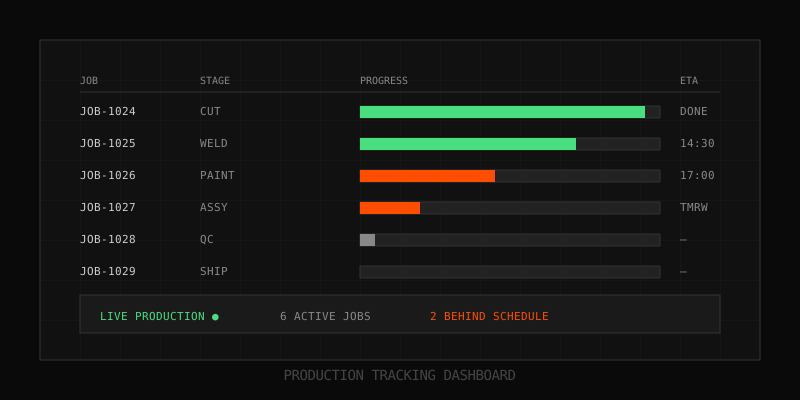
A live board with one row per open job. Customer, due date, current station, days in station, and a red/yellow/green status. Refreshes itself. No "F5 to update."
2. Let operators update status in under 5 seconds
A tablet or scanner at each work center. Operator scans job, taps "complete" or "blocked," done. If updating status takes longer than walking to the next station, it won't happen.
3. Flag delays before they become problems
If a job has been in deburr for 18 hours and the standard is 4, the system pings the scheduler — before the customer calls. This is the single highest-ROI feature and almost no spreadsheet does it.
4. Track material against the job
You can't ship if the steel is still on a truck somewhere. Linking material status (ordered / received / staged / consumed) to the job kills the #1 cause of "the part is done but we can't ship" surprises.
5. Produce one weekly report the owner actually reads
On-time %, jobs shipped, jobs late, top 3 bottlenecks. One page. Emailed Monday morning. If the report is more than a page, nobody reads it; if nobody reads it, the system has no feedback loop.
What This Looks Like Built (Real Architecture, No Fluff)
Here's how a manufacturing dashboard like this is typically built when the goal is "live in 4-6 weeks for under $20K of build cost," not "perfect for 10 years."
| Layer | Tool | Why |
|---|---|---|
| Data store | Airtable, Postgres, or SQL Server (whatever IT already has) | Cheap, well-known, easy to export later |
| Operator UI | A web app or simple PWA on cheap Android tablets | Big buttons, scanner-friendly, works on $150 hardware |
| Dashboard | Metabase, Grafana, or custom React | One screen on the office TV — owner can glance from their desk |
| Alerts | Slack / SMS / email triggered by overdue states | People don't refresh dashboards; alerts find them |
| Integration | QuickBooks, ShipStation, the existing CAD/CAM system | Don't break what already works — wrap around it |
The point of listing this is not to sell a stack. It's to show that none of this requires SAP. A two-person team can build it. The expensive part isn't the software — it's understanding the shop's actual workflow well enough to model it correctly. That's where most projects die: the team builds for the workflow the owner described, not the workflow the operators actually run.
The Job Tracking Workflow That Operators Will Actually Use
The single biggest predictor of success is whether floor operators use the system on day 90, not day 1. The rule: updating the system must be faster than the workaround. If a guy can shout "done!" across the shop and have his supervisor update a sheet, that's the bar to beat.
Practical patterns that work:
- One scanner per work center, not a shared tablet. Shared = ignored.
- Three buttons max per screen: Start, Done, Blocked (+ reason dropdown).
- QR codes printed on the traveler — operators already grab the traveler, so scanning it is zero extra steps.
- "Blocked" without a reason is rejected. This is the only place to be strict; everything else stays optional.
- No login screens. Tablets are tied to a workstation, not a user. Authentication friction kills adoption.
Shops that follow these rules typically see 85%+ operator adoption within 30 days. Shops that demand username/password login on every scan see roughly 20% adoption — operators just tell the supervisor verbally, same as before.
The Reporting Problem (And How to Avoid Drowning in Charts)
Most production dashboards fail not because the data is wrong, but because they show everything. A 40-widget dashboard with 12 filters is a wall the owner stops looking at by week two.
The dashboards that survive 12 months in the wild are aggressively minimal:
- One big number: on-time delivery % this week.
- One trend line: jobs shipped per day, last 30 days.
- One alert list: jobs currently behind schedule, sorted by customer impact.
- One bottleneck view: which work center has the longest queue right now.
That's it. Four widgets. Everything else is a click away, not on the main screen. The owner glances at it twice a day and knows whether the shop is healthy. That is the entire goal — replace the 4:47 PM Friday phone call with a glance.
What This Replaces (And What It Doesn't)
A production tracking system is not an ERP and shouldn't pretend to be. Here's the honest scope:
| Function | Production tracking handles it? | Where it lives otherwise |
|---|---|---|
| Job status / WIP visibility | Yes — core feature | — |
| Material status against jobs | Yes | — |
| Late-job alerts | Yes | — |
| Invoicing & AR | No | QuickBooks / Xero (integrate) |
| Payroll & HR | No | Gusto / ADP |
| Quoting / estimating | Sometimes | Existing estimating tool |
| CAD / nesting | No | SolidWorks / SigmaNEST |
The win is that you can keep every other system you already paid for. The tracking layer becomes the connective tissue, not the new master. This is the opposite of the ERP pitch, which is "rip everything out and rebuild on us." It's also why this approach actually finishes.
The 30-60-90 Rollout That Actually Works
For shops that have tried and failed at this before, the failure mode is almost always "tried to do it all at once." The version that survives looks like this:
Days 1-30: One work center, one report
Pick the most painful station (usually the bottleneck — laser, press brake, or assembly). Put a tablet there. Track start/done/blocked. Send the owner one report on Friday. Don't touch anything else. Goal: prove the data is real.
Days 31-60: Roll out to every work center
Same UI, more tablets. Add the live dashboard on the office TV. Add Slack alerts for jobs past due. Don't add features yet. Goal: end-to-end job visibility for every open job.
Days 61-90: Connect material + customer-facing
Link receiving to job status. Send customers automatic shipment confirmations. Build the weekly bottleneck report. Goal: cut the "where's my order?" calls by 70%+.
After 90 days, you have what an ERP implementation promised in 12 months, for roughly 1/10th of the cost, and your operators actually use it because it was built around them, not bolted on top of them.
How OpsMavix Approaches This
This is the work OpsMavix does day to day — building lightweight, custom operations systems for small manufacturers and service businesses who can't justify a full ERP but have outgrown spreadsheets. The pattern above is not theoretical; it's the actual rollout playbook we use with sheet-metal shops, CNC houses, custom fabricators, and food manufacturers. We don't sell software licenses. We build the system you need, hand you the keys, and stay on retainer only if you want us to.
If you're stuck somewhere between "the spreadsheet is failing" and "the ERP quote was $180K," the first thing worth doing is a Operations Leak Audit — a 90-minute walkthrough of your current job flow, where we map out the specific places your production process is losing time and money. You leave with a one-page diagnosis. No deck, no pressure, no obligation to build anything with us. About half the shops we audit implement the fixes themselves — which is fine. The audit is the value.
Book one at opsmavix.com. Bring the spreadsheet. We'll show you where it's leaking.
Learn more: How it works · Why bundles beat raw thread history